


The myCred Loyalty Dashboard for gamified rewards management is a comprehensive management tool designed to help businesses and administrators track, manage, and optimize their customer rewards ecosystem.
This intuitive interface brings together essential loyalty metrics, customer engagement data, and performance analytics in one centralized hub. Whether you’re monitoring program performance or understanding customer behavior, this dashboard provides the insights you need at a glance.
Key Features of the myCred Dashboard
Designed with both clarity and functionality in mind, the new dashboard consolidates all your key metrics into an intuitive, visually appealing layout. The myCred Loyalty Dashboard is not only a management tool—it’s your partner in improving your rewards and retention program.
Each section of the Loyalty Dashboard has been created to make the lives of site admin easier.
Action Bar
Following the greeting, you will see a toolbar that brings together quick administration actions, user search, data filtering options, and dashboard visibility settings in one place.

Quick Actions
Represented by a lightning strike icon, the quick-action trigger button opens up a dropdown menu to give you fast access to core admin actions without navigating away.
- Award Points: Lets you manually grant a specific number of points to any selected user. This is useful for rewarding users outside of what automated hooks can handle.
- Deduct Points: Allows you to remove points from a user’s balance as needed. This is helpful for applying penalties, correcting errors, or making balance adjustments.
- Hooks: Opens the Hooks configuration page, where admins set up automatic point-triggering events. Users can earn points for actions such as logging in, completing a purchase, or submitting a comment.
- Settings: Takes you to the myCred general settings page, where you can configure point labels, log behavior, user caps, and other global plugin options.
Search Bar
The dashboard makes it easy for you to look up a specific user by name through an intuitive search bar. Upon finding your desired user, you can open their dedicated profile page to manage point balances, add or remove badges and ranks, reset their balance, and check points history.
Point Labels Filter
This filter is particularly useful if you have configured multiple point types, such as Points, Tokens, or Credits. Using this dropdown, you can view the data for a specific point type independently.
Time Filter
Your loyalty program accumulates useful data over weeks and months. Using the Time Filter, you can review its performance over a specific time period; daily, weekly, monthly, etc. You can also select a custom time period for a more targeted look.
Dashboard View Menu
The burger menu opens additional navigation or display options for the dashboard view.
Loyalty Metrics Hub
At the start of your dashboard, the Loyalty Metrics Hub provides a bird’s-eye view of your program’s core health indicators. This section features four key metric cards, each designed to give you instant insight into different aspects of your loyalty ecosystem.

Active Members
The Active Members card displays the total number of currently engaged participants in your loyalty program. This metric helps you understand your program’s reach and identify trends in member acquisition and retention over time.
Points Awarded
Track the total points distributed to your members through various activities and engagements. This metric gives you visibility into how actively your members are participating and earning rewards within your ecosystem.
Points Deducted
Monitor points that have been removed from member accounts, whether through redemptions, expirations, or administrative adjustments. This helps maintain transparency and accuracy in your point accounting.
Outstanding Points
See the total points currently held by all members that have not yet been redeemed. This liability metric is crucial for financial planning and understanding the potential redemption pressure on your program.
WooCommerce Metrics Hub
Most ecommerce sites have loyalty programs and WooCommerce site owners aren’t any different. The myCred Loyalty Dashboard has a WooCommerce view. This section displays how effective your loyalty program is and the value you are driving from it.

Points Earned
This metric shows points accumulated specifically through purchase activities on your WooCommerce store. It helps you understand the direct connection between sales and loyalty engagement.
Points Redeemed
Track the percentage and volume of points being converted into discounts or rewards at checkout. This metric indicates how effectively your rewards are motivating purchase behavior.
Revenue
Monitor the direct revenue generated through activities based on points earned and redeemed as rewards.
Average Order Value Lift
See how your loyalty program impacts customer spending habits. This metric compares the average order value of loyalty members versus non-members, demonstrating the value your program adds to each transaction.
Visual Analytics and Charts
The Loyalty Dashboard transforms raw data into actionable insights through a series of beautifully designed visualizations. Each chart is carefully crafted to highlight specific aspects of your program’s performance.
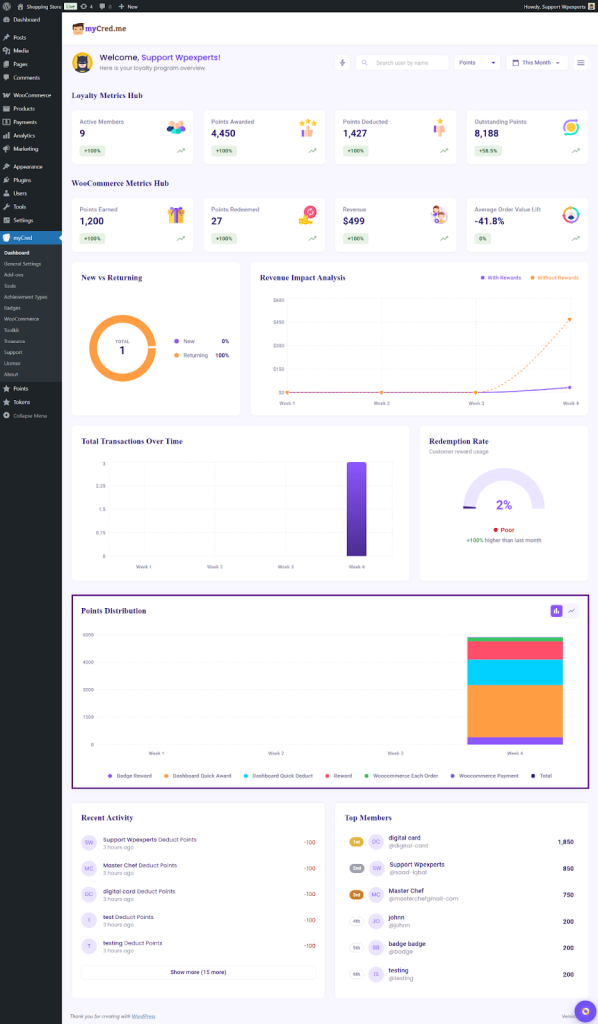
New vs Returning Members
A circular visualization that breaks down your member base into new acquisitions and returning participants. This helps you balance your growth strategy between attracting new members and retaining existing ones.
Revenue Impact Analysis
A comparative line chart that displays revenue trends with and without your loyalty rewards program. This powerful visualization demonstrates the tangible financial impact of your loyalty initiatives over time.
Total Transactions Over Time
Track transaction volume across different time periods with this bar chart. Identify peak activity periods and seasonal trends to optimize your marketing and promotional timing.
Redemption Rate Gauge
A visual speedometer-style gauge that shows your current redemption rate percentage. The gauge includes performance indicators (Poor, Fair, Good, Excellent) to help you quickly assess whether your reward offerings are resonating with members.

Points Distribution
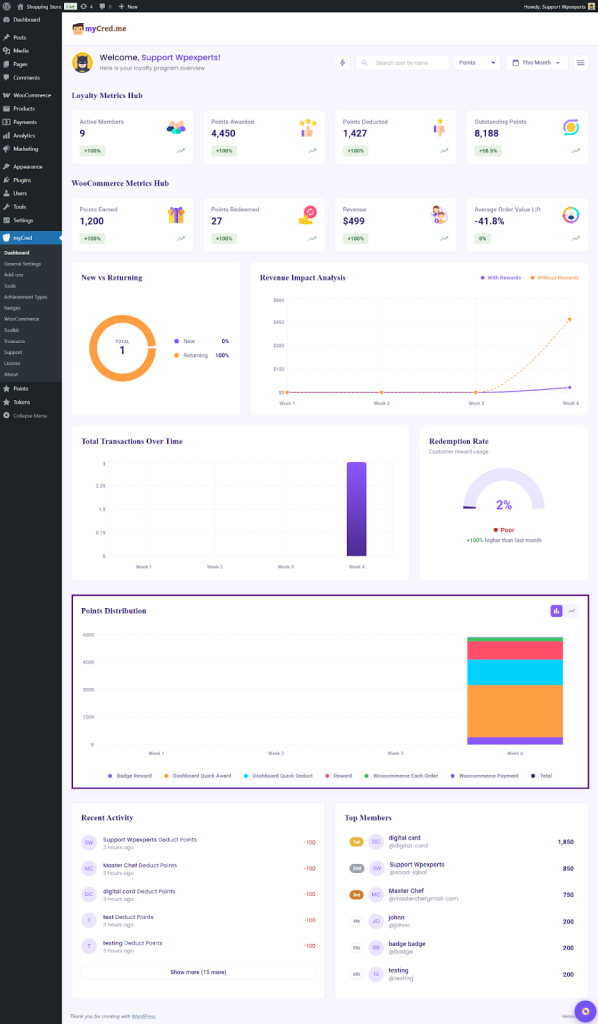
This bar chart illustrates how points are being distributed across different time periods, with separate tracking for bulk assignments and total points. Use this to identify unusual patterns or spikes in point allocation.
Recent Activity Feed
A chronological list of the latest point transactions, showing member names, activity types, and point changes. This real-time feed helps you stay on top of program activity without needing to run separate reports.
Top Members Leaderboard
Recognize and celebrate your most valuable loyalty members with a ranked leaderboard showing point totals. This feature not only helps you identify your VIP customers but can also inspire healthy competition among members.
Key Benefits of The Loyalty Dashboard
With the new Loyalty Dashboard, all your WordPress and WooCommerce loyalty data lives in one straightforward view. You gain immediate clarity on your program’s performance without the technical overhead. The dashboard brings together every critical metric so you can focus on strategy rather than data collection.
- Real-Time Insights: The dashboard provides up-to-date information on program performance, allowing quick decision-making and rapid response to trends.
- Multi-Dimensional Analysis: By combining member data, transaction information, revenue impact, and engagement metrics, the dashboard supports comprehensive program analysis.
- E-Commerce Integration: Seamless WooCommerce integration means your loyalty program metrics align directly with your sales data, providing accurate ROI assessment.
- Trend Identification: Historical data visualization helps identify patterns, seasonal trends, and opportunities for program optimization.
- Member Recognition: The top members section and recent activity log foster a sense of community and recognition within your loyalty program.
- Performance Tracking: Percentage change indicators and comparison metrics make it easy to assess program growth and effectiveness over time.
Explore Now
The all-new myCred Loyalty Dashboard is a treasure trove of insightful data that helps WordPress and WooCommerce site owners make the correct decisions to boost their business.
The Dashboard is part of the myCred Core (Free) plugin, where admins can view insights within the Loyalty Metrics Hub and Points Distribution. If you have a Addon Pro license, you’ll also unlock access to the Recent Activities and Top Members cards.
Since WooCommerce includes its own Metrics Hub, the Points Earned and Points Redeemed metrics are available to all users, while the Revenue-related cards are accessible only to Pro license holders.
Enjoy powerful insights right away by upgrading myCred from your WordPress admin. When you are ready, just buy a Pro license for game-changing upgrades that turn loyalty into revenue!