


Repeat customers cost less to sell to than new ones. They spend more per order too. But customer loyalty in WooCommerce doesn’t come with anything built in to keep customers coming back. No points system. No loyalty tools. Nothing.
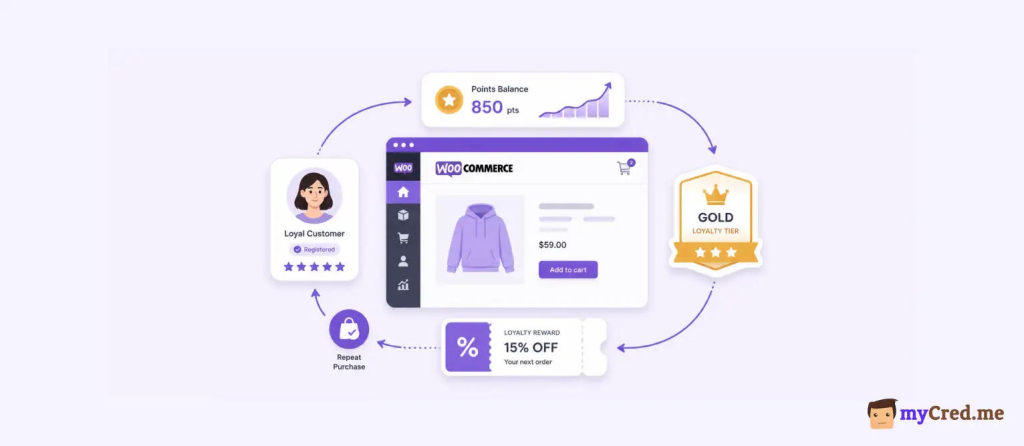
If you want customers to stick around, five things actually move the needle: points and rewards, tiered access, referral incentives, personalized retention email, and post-purchase communication.
None of these need a specific plugin to work as ideas. They’re strategy first, tools second. This blog covers both.
First, the strategy behind each lever, so you understand why it works before you touch any settings. Then a hands-on setup using myCred, a WooCommerce-native loyalty plugin built for this exact job, with a straight comparison against the other real option so you’re not picking blind.
Does WooCommerce Have Built-In Customer Loyalty Features?
No.
The core WooCommerce plugin doesn’t have a points system, tier structure, or referral tracking.
If you install WooCommerce and nothing else, there’s no way to reward repeat customers automatically. You’d have to do it manually, coupon by coupon.
To get any of that, you need a WooCommerce loyalty plugin. That includes official extensions sold through woocommerce.com and independent plugins like myCred or WPLoyalty.
All of them exist because core WooCommerce doesn’t cover this.
The 5 Proven Levers to Increase Customer Loyalty in WooCommerce
Loyalty isn’t one thing. It’s five separate mechanisms, and each one works for a different reason.
Here’s what actually moves repeat purchases, before we talk about any WooCommerce customer loyalty plugin.
Points and Rewards Programs
A points and rewards program gives customers points for buying, then lets them redeem those points for discounts or free products. It works for two reasons.
- First, points show visible progress. Customers can see themselves getting closer to a reward, and that pulls them back to finish the job.
- Second, once someone has points sitting in their account, walking away feels like leaving money on the table. That’s a real return incentive, not just a nice-to-have.
A good loyalty points program has two things. A point value the customer understands without doing math, like “100 points = $1.” And redemption that’s fast, ideally one click at checkout.
Add friction to either one and the program stops working.
Tiered/VIP Access
Tiered loyalty groups customers by spend or activity, then gives the top groups better treatment. Bronze, Silver, Gold. Whatever names you use.
Tiers beat flat discounts for one reason: status doesn’t wear off.
A 10% discount is a 10% discount, every time, forever. But a Gold tier means something. Customers protect it. They spend more to keep it or reach the next one up.
That’s a behavioral lever a flat discount can’t touch, and it’s specifically effective on your highest-value customers, the ones a blanket discount would’ve given a break to for free anyway.
Referral Incentives
Referral programs reward existing customers for bringing in new ones. This gets you customers at close to zero acquisition cost, since you’re paying in points or credit instead of ad spend.
Timing matters more than most stores realize. Ask for a referral right after signup, and you get nothing; the customer hasn’t bought anything yet, so they have nothing to vouch for.
Ask right after a purchase, when satisfaction is highest, and referral rates go up. Post-purchase timing is the difference between a loyalty referral program that works and one that sits unused.
Personalized Retention Communication
Generic email blasts get ignored. Personalized retention email, sent based on a specific trigger, doesn’t.
Birthday emails. Purchase-anniversary emails. And the most valuable one: an email that goes out when a regular customer goes quiet, a lapsed-buyer trigger, before they’ve fully churned.
A birthday email means something because it’s about the customer. A “we miss you” email sent to someone who bought last week means nothing, and worse, it tells them you’re not actually paying attention.
The message only works if the timing proves you know who they are.
Reducing Purchase Friction for Returning Customers
Most loyalty content skips this one, but it belongs here. Reducing checkout friction for returning customers means saved payment methods, one-click reorder, and a checkout that recognizes a logged-in customer instead of treating them like a stranger every time.
This isn’t a reward. It’s removing a reason not to buy.
A customer who liked your product but has to re-enter their card details and shipping address every single time is a customer you’re losing to whichever competitor made it easier.
Loyalty isn’t only about giving people a reason to come back; it’s also about not giving them a reason to leave.
What’s the Best Way to Implement Customer Loyalty in WooCommerce?
WooCommerce doesn’t build any of the five levers above on its own. Every one of them needs a plugin. So the real question isn’t whether to use one, it’s which one.
Here’s where the options actually differ, before you pick.
Important Clarification: Smile.io Does Not Work with WooCommerce
If you’ve searched for WooCommerce loyalty plugins, you’ve probably seen Smile.io come up. Skip it. Smile.io is built for Shopify and BigCommerce.
Per Smile’s own help center, it doesn’t integrate with WordPress or WooCommerce at all, and hasn’t for a while now, despite what some older blog posts still claim.
So if you’re comparing “myCred vs Smile.io for WooCommerce,” you’re comparing one real option against one that isn’t available on your platform.
Worth knowing before you spend an afternoon on a demo call that goes nowhere.
myCred vs. WPLoyalty to Increase Customer Loyalty in WooCommerce
Two WordPress and WooCommerce loyalty plugins actually compete here. Here’s how they differ.
| myCred | WPLoyalty | |
|---|---|---|
| Core model | Points-and-hooks engine with gamification (ranks, badges, leaderboards) | Points-and-campaigns engine, referral-first |
| Native to | WordPress broadly, works with WooCommerce, BuddyPress, LMS plugins, memberships | WooCommerce specifically |
| Payment redemption | Native gateway through the myCred WooCommerce Plus add-on, pay full or partial order with points | Convert points to coupon codes |
| Gamification depth | Ranks, badges, leaderboards built in | Tiers and levels, no badge or leaderboard system |
| Starting price | $99/year, 1 site (Basic plan). WooCommerce Plus is a separate add-on, included from the Professional tier at $149/year up | $105/year, 1 site, list price. WPLoyalty runs a live multi-year discount as of writing |
| Free tier | Yes, core plugin on WordPress.org | Yes, WPLoyalty Lite |
myCred’s loyalty program goes deeper if you want gamification beyond points, ranks and badges that work across your whole site, not just checkout. It also works outside WooCommerce. So, if you’re running BuddyPress or an LMS alongside your store, one plugin covers all of it.
WPLoyalty’s edge is focus. It’s built for WooCommerce and nothing else. If gamification isn’t a priority and you just want points and referrals working fast, WPLoyalty gets there with less configuration.
Neither wins outright. It depends on whether you want a WooCommerce rewards plugin that does one thing well, or a broader WordPress gamification system that happens to include WooCommerce.
How to Set Up a WooCommerce Loyalty Program Using myCred
Here is a step-by-step guide to use myCred and increase customer loyalty in WooCommerce:
Step 1 — Install and Configure myCred
Install myCred from the WordPress.org repository, or upload the premium version if you’ve bought a plan.
Go to myCred → Point Types and set up your point type.
Loyalty Points, Cashback Points, whatever fits your program. If you want points to carry a clear dollar value, like 100 points = $1, set that exchange rate now.

Then head to myCred → Add-ons and turn on what you need. Gateway, Notifications, Ranks, Badges.
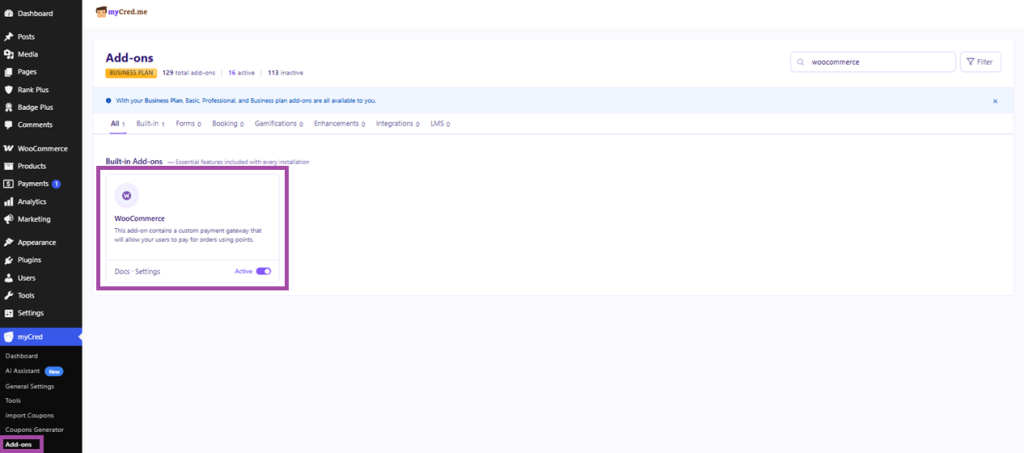
Only enable what you’ll actually use, extra add-ons just add clutter to the settings screen.
Step 2 — Enable the WooCommerce Payment Gateway
Make sure WooCommerce is installed and active first.
Then go to WooCommerce → Settings → Payments and turn on the myCred Gateway, part of the myCred WooCommerce Plus add-on.
Give it a label customers will understand, something like “Pay with Loyalty Points.” Decide if you’re allowing full payment with points, partial payment, or both.
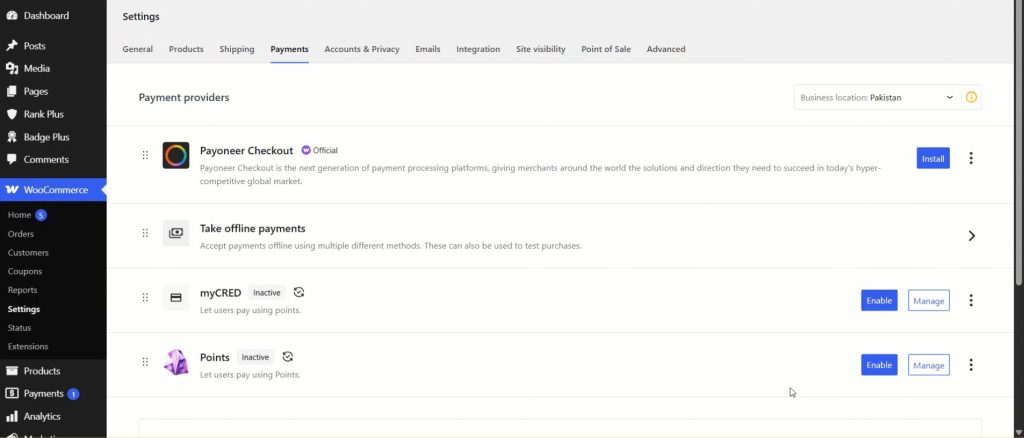
One thing to flag here: rewards only work for logged-in users. Guest checkouts don’t earn points.
If a big share of your traffic checks out as a guest, that’s worth knowing before you build the whole program around points.
Step 3 — Set Earning Rules for Purchases and Engagement
Set up purchase rewards first. You can go with a flat percentage of order value as points, fixed points per product, or category-based percentages if you want to push specific product lines.
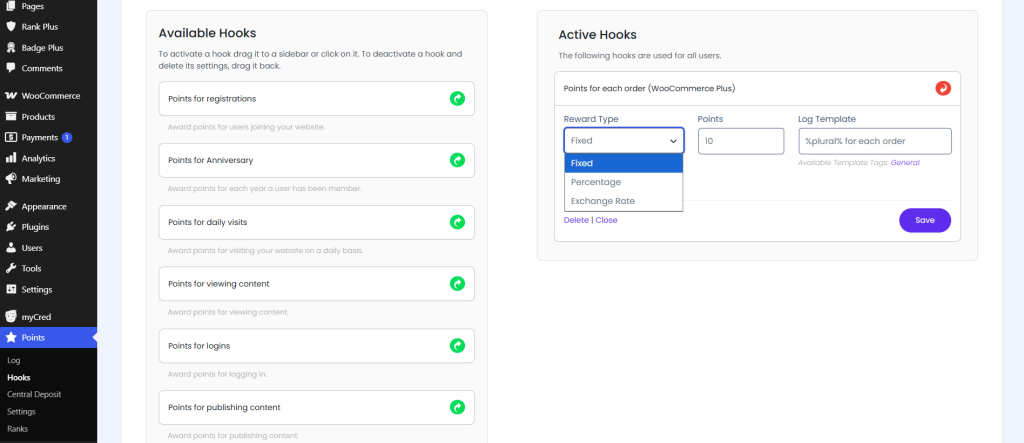
Then layer on engagement rewards. Account registration, daily visits, referrals, birthday points.
If you’re on the Pro plan, you can also reward reviews through the Judge.me integration.
myCred uses “Hooks” to automate all of this. Set a hook once, and it fires automatically every time the trigger happens. No manual point assignment needed.
Step 4 — Build Redemption Rules
Decide how customers spend their points.
Direct payment at checkout through the myCred gateway is the simplest path. Converting points to coupons gives you more control over minimum order values and expiry.
Set a minimum redemption threshold so customers aren’t cashing out five points for a discount.
And if you want exclusivity, you can restrict certain products or categories to specific ranks or badges only.

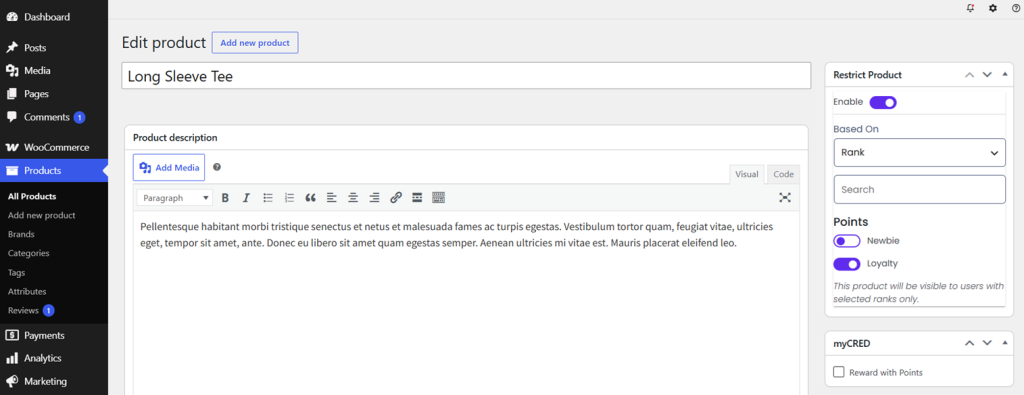
Step 5 — Add Ranks, Badges, and Tiers to Increase Customer Loyalty in WooCommerce
This is optional, but it’s where myCred pulls ahead of a plain points management system.
Build ranks based on total points or total spend: Bronze, Silver, Gold, whatever fits your brand.
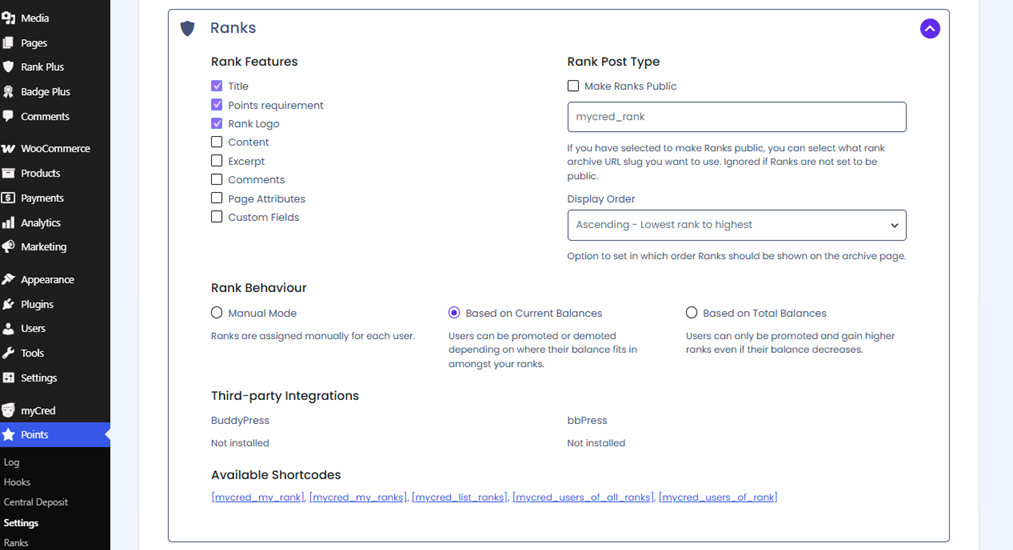
Give each rank real benefits. Higher earn rates, exclusive discounts, early access to sales. Then design badges for specific achievements and let customers see them on their profile.
A badge for a 10th purchase costs you nothing and gives customers a reason to keep going.
Step 6 — Display Balances and Promote the Program
None of this works if customers don’t know it exists.
Show point balances on the user profile, in the site header, or through a widget or shortcode on key pages.
Add messaging to your homepage, product pages, cart, and checkout. And turn on email notifications so customers know the moment they earn or redeem points.
Customer loyalty increases and drives repeat purchases if people remember that the loyalty program exists.
How to Create Segmentation, Gamified Campaigns, & Referral Loops to Increase Customer Loyalty in WooCommerce
Once the basics are running, here’s how to get more out of them.
Segment-Specific Campaigns
Not every customer needs the same offer.
Target your highest spenders with bonus points on specific categories, the ones already buying premium items, give them a reason to buy more of them.
For customers who’ve gone quiet, set up a lapsed-buyer rule that awards extra points on their next purchase within a set window, say 30 or 60 days.
It’s a direct answer to “how do I bring back inactive customers,” and it costs you points, not ad spend.
Gamified Challenges and Seasonal Promotions
Run limited-time challenges to spike engagement.
A “double points weekend” or “earn a badge for 3 purchases this month” gives customers a reason to act now instead of later.
Tie these to holidays or product launches, Black Friday, a new collection drop, whatever fits your calendar. This is where seasonal loyalty campaigns live, and they work because they’re temporary.
Scarcity plus a game element moves people faster than a standing discount ever will.
Referral and Affiliate-Like Programs
Reward existing customers for bringing in new ones, with points or a rank boost instead of cash.
Pair this with unique referral links or coupon codes so you can actually track who sent who.
Without tracking of an increase in customer loyalty in WooCommerce, you’re running a referral program on faith. With it, you know exactly which customers are worth treating like partners.
Multi-Site and Cross-Store Loyalty
If you’re running a multi-site network, myCred supports sharing or separating point balances across sites.
That means one loyalty program can span multiple niche stores under the same brand. Resultantly, a customer earns points on one site and spends them on another.
Worth setting up if you run more than one storefront and want customers moving between them instead of treating each one as a separate relationship.
What are the Common Mistakes That Kill WooCommerce Customer Loyalty Programs
Choosing a platform that doesn’t match your store
This is the mistake that sends people down the wrong path before they’ve even started. Spend time evaluating a tool that doesn’t run on your platform, like Smile.io on a WooCommerce store, and you’ve wasted setup time on something you can never launch. Confirm platform compatibility first. Everything else is secondary.
Overcomplicating the rules
Too many point types, confusing redemption paths, customers who can’t figure out what their points are worth. If a customer has to think hard to understand your customer loyalty program, they’ll ignore it.
Setting point values too low
If it takes 10,000 points to get a $5 discount, the reward feels meaningless, and nobody bothers chasing it. Points need to feel worth earning.
Not communicating the program
No banners, no emails, no mention at checkout. A loyalty program nobody knows about doesn’t drive repeat purchases; it just sits in your plugin list doing nothing.
Ignoring the data
Set it up once and never look at it again, and you’ll never know if it’s working. Check the dashboard. See what’s getting redeemed, what’s ignored, and adjust the rules based on actual user behavior to increase customer loyalty in WooCommerce.
Last Word on How to Increase Customer Loyalty in WooCommerce
Increasing customer loyalty in WooCommerce comes down to five things: points and rewards, tiered access, referral incentives, personalized retention email, and reducing friction for returning customers. None of these are complicated ideas. They just need a tool that actually runs on your platform.
myCred is that tool for WooCommerce. It covers all five levers, adds gamification most plugins skip, and works alongside the rest of your WordPress stack if you’re running more than just a store.
Explore myCred’s WooCommerce loyalty features or check the pricing plans to see which tier fits your store.