

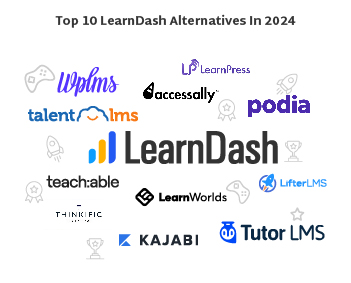
As per the study, the eLearning industry has exploded in recent years, with the global market projected to reach $374 billion by 2026. As digital courses and online learning continue to grow, the need for customizable learning management systems (LMS) has also increased. One of the most popular and widely used LMS platforms is LearnDash.

What is LearnDash
LearnDash is a powerful WordPress learning management system (LMS) designed for LearnDash experts. It is a user-friendly LMS platform where you can create engaging online courses, manage students, track progress, and even sell your knowledge directly. It enables you to create interactive lessons, quizzes, gamification tools, and beautiful themes seamlessly integrated with the familiar WordPress interface.
First launched in 2012, LearnDash allows course creators to build, customize, and sell online courses easily. With its drag-and-drop course builder, built-in quizzes, user management tools, and flexible monetization options, LearnDash has become a go-to solution for entrepreneurs, educators, and businesses wanting to create their online academies.
Why You Need LearnDash Alternatives in 2025
As a WordPress user you need plugins to fix various things and it is kind of a habit you get into. However, running a WordPress plugin for online course can backfire due to various reasons:
– WordPress plugin hurts the website’s UX, negatively affects site speed, and create different vulnerabilities.
– WordPress also messes things up.
– A programmer will need to modify LearnDash to make it appear halfway respectable and it won’t look as well as the other LearnDash alternatives listed below.
– LearnDash’s billing and checkout features are restricted. To achieve your goals, you may need to use another plugin with its own set of issues.
Benefits of Using LearnDash
Before diving into the LearnDash alternatives, let’s first look at some of the main benefits and advantages of using this amazing LMS platform by LearnDash experts:
Customizable course builder – LearnDash’s course builder allows you to fully customize the look and feel of your course with different designs, layouts, and branding. You can easily rearrange, duplicate, and edit course content.
Flexible monetization – LearnDash integrates with popular payment gateways like PayPal and Stripe to accept one-time payments, subscriptions, and bundled course packages. You maintain full control and get to keep 100% of your revenue.
Robust reporting – Detailed student progress, engagement, and earnings reports provide vital insights into your courses and students. LearnDash even integrates with Google Analytics for advanced tracking.
User management – Assign roles, permissions, and access to create admins, instructors, and students. Automate user enrollments and restrict course access.
Mobile responsive – Courses render beautifully across all devices. The LearnDash mobile app also allows students to download courses for offline access.
Active ecosystem – As one of the most established LMS platforms, LearnDash enjoys a vibrant ecosystem of developers, designers, and partners. There’s a wide selection of add-ons and an engaged community forum.
For course creators wanting maximum design flexibility, control over monetization, and robust analytics, LearnDash is an excellent choice loved by over 300,000 users.
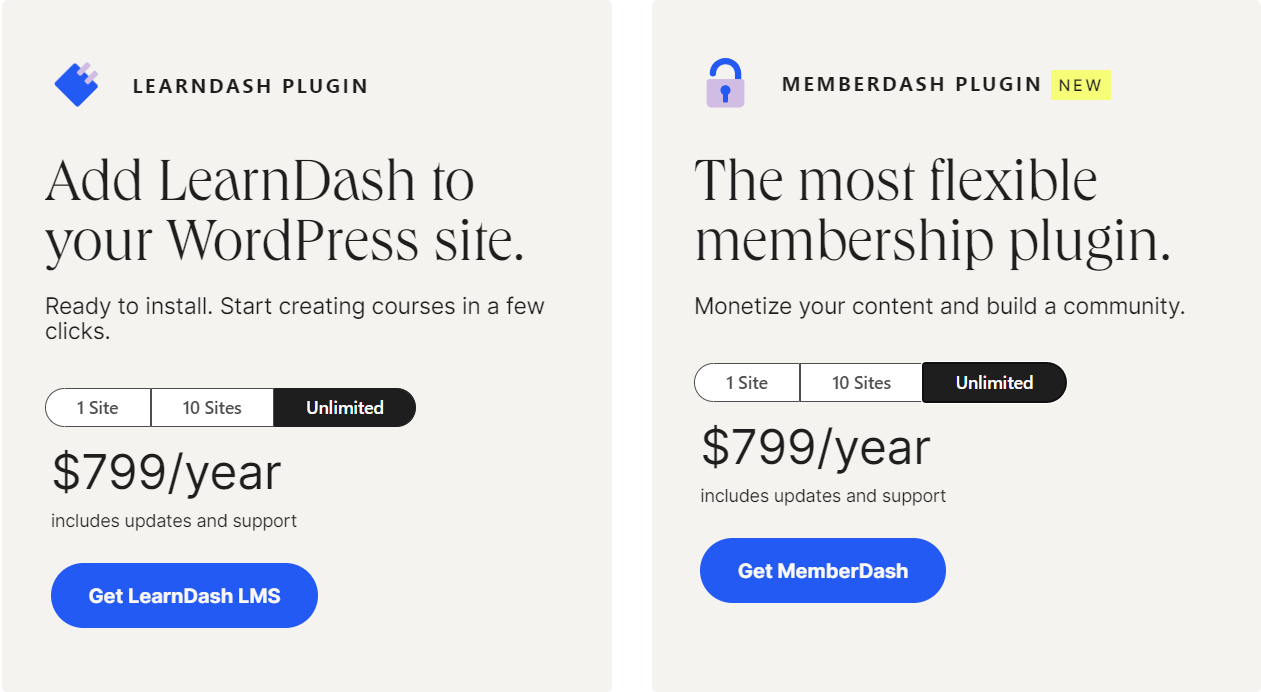
LearnDash Pricing Plans
LearnDash offers a diverse pricing plan as a WordPress LMS. Here is a breakdown
Plan 1: LearnDash Plugin
- $199/year – 1 site
- $399/year – 10 sites
- $799/year – Unlimited
Plan 2: MemberDash Plugin (For content monetization and community building)
- $199/year – 1 site
- $399/year – 10 sites
- $799/year – Unlimited
How MyCred is a Massive Boost for LearnDash
myCred is a premium WordPress gamification plugin. It enables all businesses to gamify their operations, and LearnDash is no different. myCred offers a LearnDash-oriented addon called myCred LearnDash Points Importer.
This myCred addon enables users to import points from LearnDash to myCred. These imported points are added to the myCred point balance and can be redeemed for different products. Here is the step-by-step documentation process for getting this addon and gamifying online learning.
Install and activate myCred LearnDash Points Importer.
Top 11 LearnDash Alternatives For Online Education in 2025
LearnDash may not fit every use case. Many LearnDash alternatives offer different features, pricing models, and overall experiences worth considering before committing to LearnDash.
This guide will cover the key benefits and negligible drawbacks of using LearnDash and the top 11 LearnDash alternatives in 2025.
1. Teachable
Teachable is one of the most popular and user-friendly LearnDash alternatives. It’s one of the leading LMS alternatives for online course creators who want beautiful course pages, integrated marketing tools, and easy course authoring.
Some key features include:
Beautiful course pages – Pre-built templates make it easy to create professional course pages to engage students.
Powerful marketing tools – Email newsletters, affiliate management, coupons, and bundles help sell courses.
Simple course builder – The easy drag-and-drop builder makes uploading content and videos to create courses fast.
Analytics – Get insights into traffic sources, conversion rates, top-performing content, and more to improve course marketing.
Mobile apps – Native iOS and Android apps allow students to download courses for offline access.
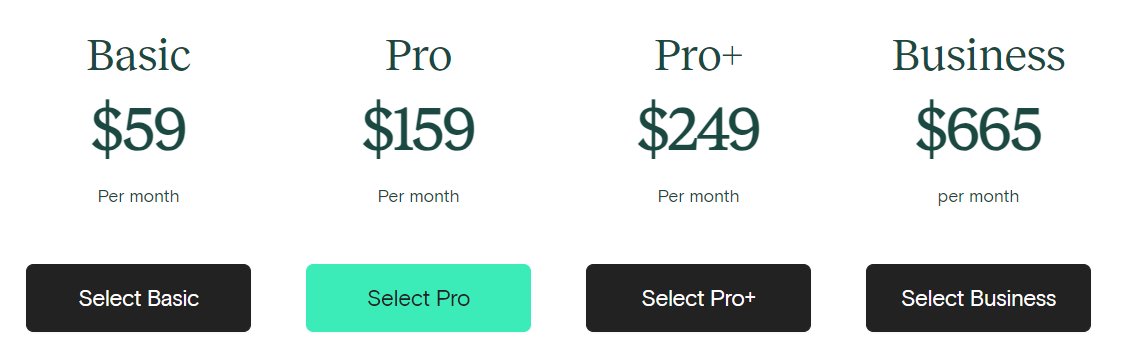
Pricing
Teachable has monthly pricing plans as follows.
Pros
- Easy-to-use course builder and stylish course pages
- Built-in marketing and payment tools
- Higher payouts compared to rivals (97% minus payment fees)
Cons
- Less flexibility and customization compared to LearnDash
- Transaction fees of 2-4% plus payment processing fees
Overall, Teachable is a massive LearnDash alternative for beginners wanting beautiful courses with integrated marketing tools. The more affordable pricing and higher payouts also appeal to instructors earning income from their courses.
2. LearnWorlds
LearnWorlds positions itself as one of the all-in-one LMS alternatives for creating and selling online courses. Along with a streamlined course builder, it includes built-in marketing automation and secure social learning features.
Key features include:
Interactive course builder – Easily create engaging multimedia courses with videos, quizzes, and live classes.
Marketing automation – Email sequences, design landing pages, affiliates, and promo tools help convert traffic.
Social learning – Create a members-only social learning network. Allows DMs, course discussions, and study groups.
Branded apps and sites – Publish branded mobile apps and mini-sites to distribute your academy outside LearnWorlds.
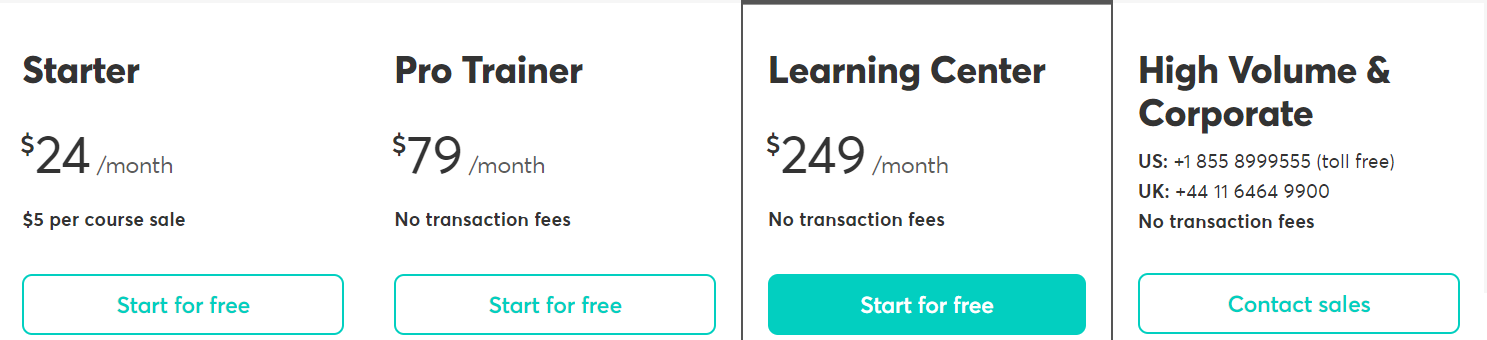
Pricing
LearnWorlds has four payment plans available as follows:
Pros
- Automated marketing tools and sequences
- Built-in social learning environment
- Ability to publish branded apps and sites
Cons
- More limited design customization compared to LearnDash
- They haven’t been around as long as other LMS platforms
If you want an all-in-one platform for LearnDash experts with marketing automation, LearnWorlds is a useful contemporary LMS alternative. It offers a bundle of course creation, marketing, and social learning.
3. AccessAlly
AccessAlly is a newer cloud-based LMS. As one of the leading LMS alternatives, it is gaining popularity due to its compliance tools, beautiful templates, and all-inclusive pricing. It’s an effective option for educational institutions and corporate training programs needing to meet accessibility standards.
Features include:
Compliance tools – Ensures ADA, WCAG 2.1, and Section 508 compliance for accessible eLearning.
Templates – Professionally designed course templates for faster course creation.
All-inclusive pricing – A single price includes unlimited courses, storage, bandwidth, and more.
User management – Custom roles and administrative controls to manage students and instructors.
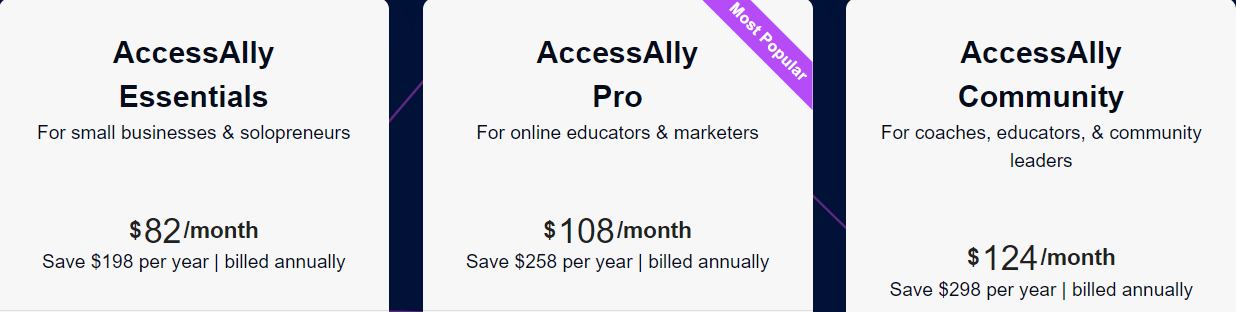
Pricing
AccessAlly has yearly pricing plans as follows:
Pros
- Helps meet important eLearning compliance requirements
- Affordable all-inclusive pricing
- Great templates and design capabilities
Cons
- Less flexibility for developers compared to LearnDash
- More limited payment options compared to other LMS platforms
AccessAlly is ideal for academics and organizations needing an accessible, compliant LMS solution on a budget.
4. ProProfs LMS
ProProfs LMS is a cloud-based learning management system focused on AI-assisted course creation for corporate training, compliance, and employee onboarding. Beyond AI, you have access to a strong library of pre-built courses, interactive lesson tools, and features that keep learners actively engaged
Key features include:
AI course creation – Generate complete training programs from simple prompts for faster development.
500+ expert-built, ready-made courses – Edit and customize courses on compliance, leadership, workplace safety, and other core topics.
Gamification – Use badges, points, and leaderboards to motivate learners and boost participation.
Mobile-ready training – Courses work smoothly on all devices, making learning accessible anywhere.
Reporting & analytics – Track completions, progress, and performance to identify learning gaps.
Pricing
They offer a free plan. And the paid plans are as follows:

Pros
- Makes it easier to track learners with clear reports, real-time progress updates, and insights you can actually use to improve training
- Supports 70+ languages with easy integration into HR, CRM, and SSO tools
- Strong quiz and assessment options
Cons
- No on-premise or downloadable setup
- No dark mode
ProProfs LMS is an easy-to-use training platform for teams that want quick course creation, interactive learning, assessment capabilities, and scalable training programs across different locations.
5. Kajabi
Kajabi is an all-in-one knowledge commerce platform for membership sites, online academies, and multi-product brands. Along with online courses, Kajabi includes tools for email marketing, affiliate programs, and more.
Key Kajabi features:
All-in-one platform – Combine courses with membership sites, digital downloads, email marketing, and other offerings.
Eye-catching templates – Create beautiful, polished websites and course pages from professionally designed templates in minutes.
Robust e-commerce – Integrated sales pages, coupons, affiliates, and global payment options help monetize and sell online courses and memberships.
Automated marketing – It is one of the LearnDash alternatives that offer Email automation, shopping cart abandonment, and other built-in sales funnels.
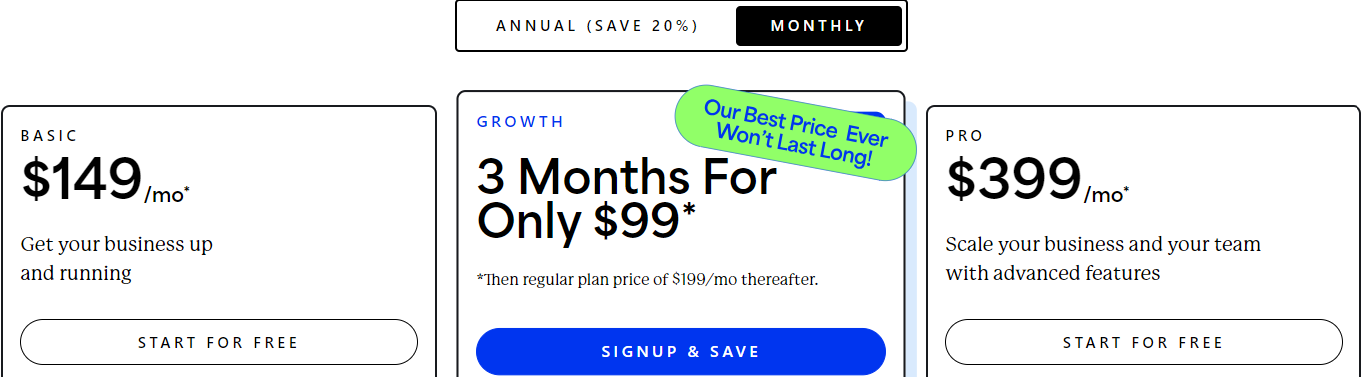
Pricing
Kajabi pricing starts at $149/month for the Basic plan. Here is the breakdown:
Pros
- All-in-one platform beyond just course creation
- Helps build complete membership sites and brands
- Beautiful templates for quicker, high-converting storefronts
Cons
- Can have a steeper learning curve than pure LMS platforms
- Transaction fees on payments, in addition to monthly fees
Kajabi is among the excellent LMS alternatives for creators who want to combine online courses with membership sites, coaching, communities, and other digital products.
6. MasterStudy LMS
If you’re looking for a modern, feature-packed alternative to LearnDash, MasterStudy LMS is turning heads for good reason.
Key features include:
Powerful Course Builder: Create lessons, quizzes, assessments, and even co-instructor driven courses using a drag-and-drop builder.
AI Lab + AI-Powered Course Creation: Use built-in AI tools to automatically generate lesson content, quizzes, and images based on prompts, afterwards you can refine and personalize.
Flexible Page Design: Seamless integration with Gutenberg, Elementor, Divi, and WPBackery means you can build custom course pages, layouts, and dashboards easily.
Advanced Analytics and Reporting: Monitor student progress, engagement, performance, and revenue across all your courses to make data-driven improvements.
Grading System Options: Supports multiple grading models: percentage, letter-grade, custom scales, giving you flexibility in assessments.
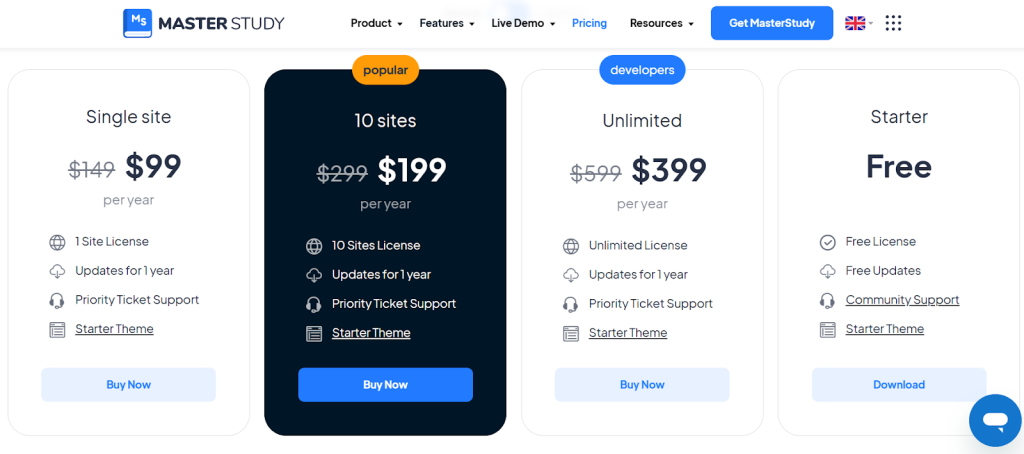
Pricing
They offer the pricing plans as follows:
Pros
- It supports multiple formats, has advanced quizzes, and flexible pricing.
- It has plenty of templates, layout control, works nicely with page builders like Elementor and Divi.
- Feature-rich free version + affordable premium plans. Lifetime options are also available.
- Good monetization & payment options: supports one-time payments, subscriptions (via integrations), course bundles, etc.
Cons
- The free version has a lot of features, but advanced ones are available only in Pro.
- Some features mean more to set up & configure.
7. LearnPress
LearnPress is a popular WordPress LMS plugin used by over 200,000 websites. It offers free and paid versions, making it one of the most affordable LearnDash alternatives.
Key features include:
WordPress plugin – Seamlessly integrates courses into any existing or new WordPress site.
Course builder – Create and customize multimedia lessons, quizzes, assignments, and lectures.
Certificates – Award certificates and diplomas upon course or quiz completion.
AffiliateReady – Full support for affiliate marketing and partnerships.
BuddyPress integration – Create social learning environments and student profiles.
Pricing
LearnPress is a free-to-install LearnDash alternative on WordPress. The paid premium version (Pro Bundle) starts at $299.
Pros
- Affordable pricing and a free version is available
- Leverages the power of WordPress for online course creation
- Active community of over 200,000 users
Cons
- Requires managing WordPress and plugins for non-tech users
- Fewer design templates compared to some other LMS platforms
LearnPress is among most popular choices for WordPress LMS alternatives wanting to turn their existing site into an LMS.
8. LifterLMS
LifterLMS is one of the top LearnDash alternatives that offers an easy-to-use course builder designed specifically for WordPress. It makes it simple for WordPress users to create and sell online courses while keeping full control of their sites.
Key LifterLMS features:
Intuitive course builder – Visually build your course structure and upload multimedia lessons.
WordPress membership integration – Offer members-only access and dripped content.
Personalized certifications – Award custom certificates and digital badges upon course completion.
Flexible monetization – Create free, paid, or membership-based courses. Sell one-time or recurring access.
Reports – Track student engagement, course progress, and sales analytics.
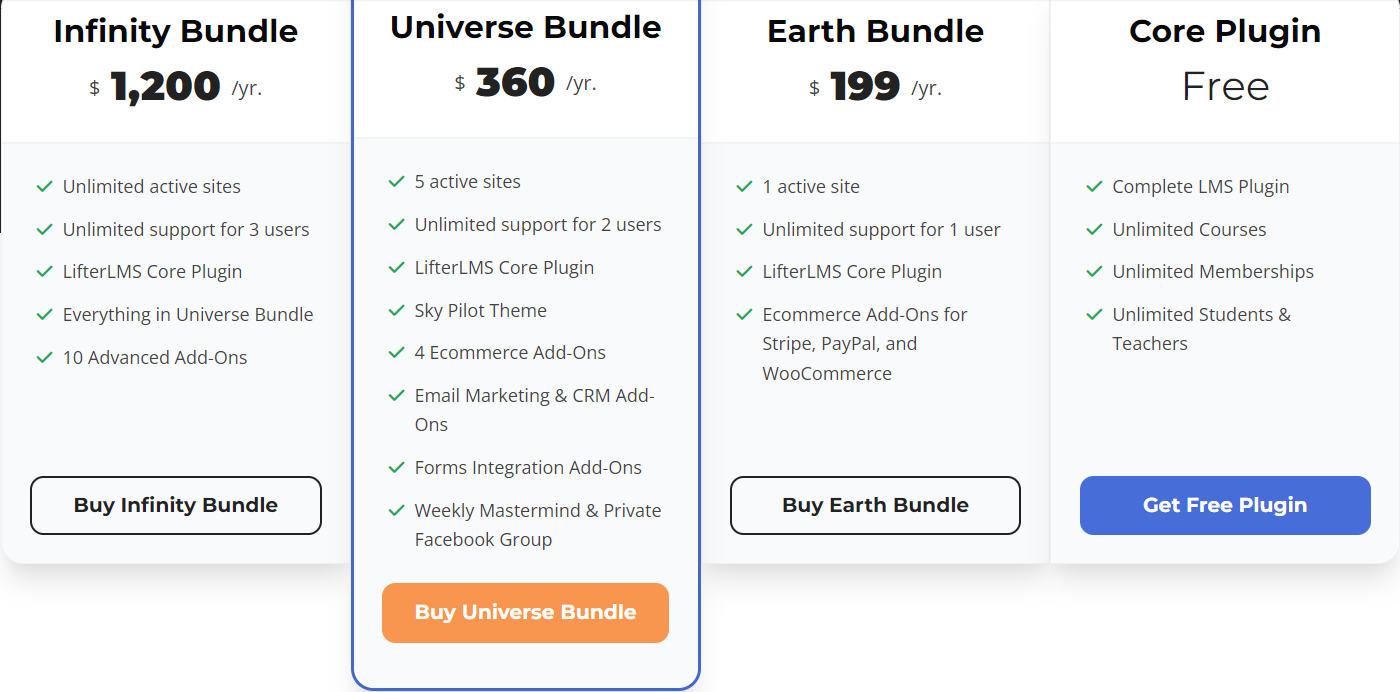
Pricing
They offer the pricing plans as follows:
Pros
- Made specifically for WordPress sites
- Simple graphical course builder
- Flexible membership and access options
Cons
- It is more basic compared to other enterprise LMS platforms
- Less design customization and templates
LifterLMS is the easiest way for WordPress users as well as for LearnDash experts to add courses and memberships to their sites.
9. TalentLMS
TalentLMS by Epignosis is among the top-rated LearnDash alternatives trusted by over 8,000 organizations. It’s known for its excellent UX, mobile optimization, and international language support.
Features include:
Streamlined interface – Clean, intuitive dashboards make it easy to manage courses and students. Praised for its usability.
Multiple language support – Support over 40 languages to serve a global audience.
Mobile optimization – iOS and Android apps allow learning on the go. Courses work seamlessly across all devices.
APIs and Zapier – Extend platform features and integrate with other applications.
Assessments – Create exams and quizzes with automated or manual grading.
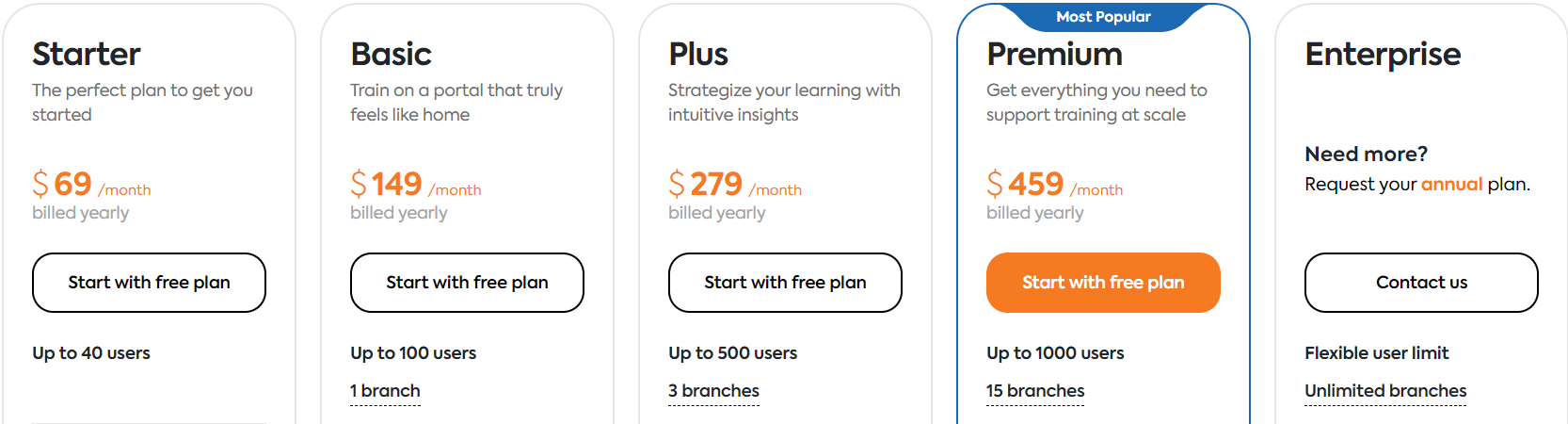
Pricing
They offer five pricing plans as follows.
Pros
- It is a very user-friendly platform and interface
- Scales well for larger businesses and universities
- Good multilingual support capabilities
Cons
- Less robust course authoring compared to other LMS
- Add-ons raise the price for additional functionality
TalentLMS is among the most affordable and usable cloud-base LMS alternatives that scales particularly well for larger organizations.
10. Podia
Podia is a sleek LMS focused on helping creators monetize and sell online courses, digital downloads, and memberships. Along with neat course-building features, it includes integrated e-commerce, email marketing, and analytics.
Key features:
Integrated e-commerce – Create landing pages, accept payments, coupons, bundles, and more. No need for external tools.
Email marketing and CRM – Send broadcast emails, automated sequences, and personalized messages to students.
Smooth course creation – Simple drag-and-drop interface to create lectures, quizzes, downloads, and discussions.
Detailed analytics – Actionable insights into traffic, engagement, conversions, and revenue data.
Pricing
Podia pricing starts at $39 per month for up to 1,000 active students. Discounts are available for annual plans.
Pros
- Combination of course authoring, e-commerce, email marketing, and analytics
- Everything is centralized in one platform
- Generous payouts at over 90% of revenue
Cons
- Less flexibility for larger corporate training programs
- Fewer advanced LMS features like compliance tools, APIs, etc.
Creators looking to easily build, market, and monetize online courses should consider Podia.
11. WP LMS
WP LMS allows you to create courses directly within WordPress without installing a separate plugin. It’s one of the fastest ways to get up and running with courses on WordPress.
The Features of WP LMS include:
Native WordPress experience – Includes built-in course pages, lessons, and quizzes. No separate plugin is needed.
Multimedia lessons – Upload videos, PDFs, Presentations, audio, and more.
Quizzes – Create assessments with different quiz types and auto-grading.
Certificates – Award personalized certificates upon course or quiz completion.
Affiliate center – Recruit affiliates and send commission payouts.
Pricing
WP LMS pricing starts at $75 for the Regular license. For the Extended license, you need to pay $3,000.
Pros
- Super fast way to add courses to WordPress sites
- There is no need to install a separate LMS plugin
- Built specifically for WordPress
Cons
- Less advanced compared to standalone LMS platforms
- Less flexibility and freedom in design
WP LMS is the fastest way to create courses directly on new or existing WordPress sites, which makes among the top-tiered LMS alteratives
12. Thinkific
Thinkific is a cloud LMS used by over 50,000 course creators. It focuses on ease of use and lets course creators get their courses online quickly.
Features of Thinkific include:
Intuitive course editor – Visually build your course structure and drag-and-drop lessons in place.
Custom domains – Connect your domain name for a branded experience.
Student management – Tools to engage students via email, forums, and social media.
Marketing tools – Coupons, drip content, bundles, and affiliates to sell courses.
Mobile friendly – Courses work on all devices, and offline mode is supported.
Pricing
Thinkific has an initial free plan. The Basic plan is $36 per month, the Start plan is $74 per month, while the Premium plan (Grow) is offered at $149/month with discounts on annual plans.
Pros
- Very easy-to-use course builder
- A great solution for beginners starting out
- Active Facebook community forum
Cons
- Less advanced features for developers
- Less design customization compared to other LMS
Thinkific is a top choice for instructors who are new to creating and selling online courses. Its simplicity makes course creation a breeze.
13. TutorLMS
TutorLMS is one of the renowned LearnDash alternatives. It is a WordPress LMS plugin used by over 100,000 instructors globally. It makes creating and selling courses directly from your WordPress site easy.
Features include:
Native WordPress experience – Seamlessly integrate courses into WordPress.
Frontend course builder – Visually build courses from the student’s perspective.
Video conferencing – Built-in video chat and virtual classrooms powered by Jitsi.
Assignments and quizzes – Engage students with individual and group assignments and automatic grading.
Pricing
TutorLMS pricing starts at $199 for one site. Their business license is $399/year, and an agency license is $799/year.
Pros
- Leverages WordPress flexibility and extensibility
- Marketplace creation is easy
- Over 80,000 active installations
Cons
- Requires managing WordPress itself
- Less advanced compared to standalone LMS
TutorLMS brings the power of WordPress together with a robust course creation plugin loved by the WordPress community.
LearnDash FAQs
Price – LearnDash plans start at $159/year for the basic plan and up to $329/year for the ultimate plan. Enterprise options are available.
Deal users – LearnDash best suits entrepreneurs, businesses, educators, and creators wanting maximum design customization and monetization control.
Ease of use – The extensive feature set comes at the cost of complexity. LearnDash has a steeper learning curve than some competitors.
Limitations – LearnDash lacks built-in marketing tools, and support options come at an additional cost. It is not ideal for webinars or video conferencing needs.
Support and Community – Support is primarily through knowledge base blog posts, forums, and paid email. It enjoys an active community forum.
Scalability – LearnDash scales from individual creators to large organizations. However, the pricing model can get more expensive for larger user bases.
Top LearnDash alternatives
Leading competitors to consider include Teachable, Kajabi, Thinkific, Tutor LMS, and TalentLMS, depending on specific use-case needs.
Is LearnDash the Best LMS in 2025?
It’s difficult to definitively claim that LearnDash is the absolute best LMS for everyone. Different platforms excel in various areas; the “best” depends on your needs and priorities. LearnDash boasts robust features, excellent gamification and course creation tools, and strong analytics, making it a top contender for many. However, other platforms like Tutor LMS or Moodle might better suit specific situations.
Is Tutor LMS better than LearnDash?
Both platforms offer strong features, but here’s a quick comparison to help you decide:
Ease of use: LearnDash has a steeper learning curve than Tutor LMS’s beginner-friendly interface.
Features: LearnDash outshines Tutor LMS in gamification, advanced course creation tools, and analytics. However, Tutor LMS offers basic features for a lower price point.
Target audience: LearnDash caters to serious course creators and established businesses, while Tutor LMS is suited for beginners and those on a budget.
Ultimately, the “better” platform depends on your needs and priorities, but LarnDash seems ahead.
What is the LearnDash equivalent?
While there isn’t a perfect equivalent to LearnDash, here are some LearnDash alternatives with similar strengths:
Tutor LMS: Similar features but simpler interface and lower cost.
LifterLMS: Excellent course creation tools and advanced features.
Kajabi is an all-in-one platform for courses, marketing, and memberships.
Thinkific: User-friendly interface and strong marketing features.
These LearnDash or LMS alternatives offer different strengths and weaknesses, so do your research.
Is there a free version of LearnDash?
No, LearnDash doesn’t currently offer a free version. However, they provide a 14-day free trial of their premium plans, allowing you to test their features before committing.
P.S. While not technically a “free version,” it’s important to note that LearnDash integrates seamlessly with WordPress. Installing the free LearnDash plugin on your WordPress website allows you to access basic LMS functionalities like creating courses, adding topics and quizzes, and tracking student progress.
Final Words
LearnDash remains one of the most powerful and customizable learning management systems in 2025. For those wanting maximum design flexibility and robust analytics, LearnDash is hard to beat. For beginners, those on a budget, or those needing integrated marketing tools, one of the LearnDash alternatives featured could be a better choice but not a replacement.
Most LearnDash alternatives and LMS competitors in 2025 offer a free trial to test the experience firsthand. Evaluating the course creator workflow, tools, and pricing models can help determine the best fit based on your specific use case, budget, and feature needs.